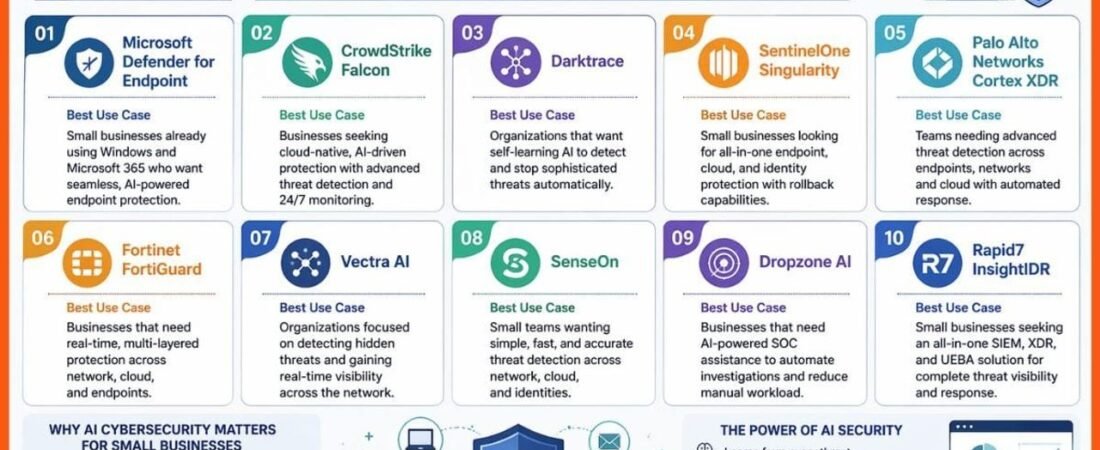
Small businesses are adding AI to customer support, marketing, sales, accounting, research, operations, and internal knowledge work. The problem is that AI tools rarely arrive as one neat system. A company may use a chatbot, a CRM assistant, an email-writing tool, an accounting add-on, a meeting recorder, and an automation platform at the same time.
That can save time, but it can also create a messy software stack with weak access controls, duplicate data, surprise bills, and unclear responsibility when something goes wrong. In 2026, security guidance is also becoming more specific about AI. NIST’s AI Risk Management Framework is being updated, and recent NIST work on a Cyber AI Profile highlights governance, AI attack surfaces, and practical risk management. NIST has also published current cybersecurity guidance aimed at small businesses.
This article shows how a small company can build a practical AI software stack without creating an enterprise-sized IT project. The goal is simple: use AI where it helps, keep sensitive data under control, limit unnecessary access, and make sure a person still owns important decisions.
What is an AI software stack?
An AI software stack is the group of tools, accounts, integrations, data sources, and workflows a company uses to perform AI-assisted work. It may include general-purpose AI tools, CRM software, accounting platforms, cloud storage, email, automation tools, customer-support software, analytics, and custom agents.
The security problem is not usually one tool by itself. It is the connection between tools.
For example, an AI assistant may be safe when it only drafts text. Risk increases when it can also read customer records, send email, update a CRM, access cloud files, and trigger payments.
Start with a software inventory
You cannot protect tools you do not know exist. Before adding another AI product, create a simple inventory of the software already used by employees and contractors.
Record these details
- Tool name and business purpose
- Account owner
- Users with access
- Whether the tool stores customer or employee data
- Whether it connects to email, CRM, cloud storage, or financial systems
- Whether it can take actions or only read information
- Monthly or annual cost
- Renewal date
- Whether the business can export its data
A spreadsheet is enough for a small company. The value comes from seeing the full picture.
Classify data before connecting AI
Not all business information carries the same risk. A public product description is different from payroll records, customer payment details, legal documents, or private health information.
Use a simple four-level model
- Public: information already intended for public use.
- Internal: routine business information that should stay inside the company.
- Confidential: customer records, contracts, pricing, financial reports, employee information.
- Restricted: highly sensitive data such as passwords, authentication secrets, full payment information, or regulated data.
Then create a rule for each AI tool. A public marketing assistant may be allowed to use public and internal information but not restricted data. A finance workflow may need confidential data but should have stronger controls and limited users.
Use least-privilege access
Least privilege means giving a user or system only the access needed for the task. It is one of the most useful security principles for AI because AI tools can connect to many systems quickly.
Example
A sales assistant needs to read leads, update notes, and create follow-up tasks. It probably does not need administrator access to billing settings, employee records, or the entire company drive.
If the integration offers several permission levels, choose the narrowest one that still allows the workflow to function.
Separate reading from acting
An AI system that reads information has a different risk profile from one that can make changes. Introduce these capabilities in stages.
Stage 1: read-only
The tool can search documents, summarize data, and make recommendations.
Stage 2: draft actions
The tool can prepare an email, CRM update, refund request, or report, but a person must approve it.
Stage 3: limited automatic actions
The tool can perform low-risk actions within defined limits, such as tagging a support ticket or creating an internal task.
Stage 4: sensitive actions
Payments, account changes, legal communications, pricing exceptions, customer deletions, and permission changes should remain tightly controlled.
This staged approach lets the business gain efficiency before granting powerful permissions.
Protect identity first
If an attacker controls an employee account, strong AI settings will not help much. Start with identity security.
- Use unique accounts instead of shared logins.
- Enable multifactor authentication wherever possible.
- Use a business password manager.
- Remove access quickly when a worker leaves.
- Review administrator accounts regularly.
- Use single sign-on when it is practical for the company.
NIST’s Cybersecurity Framework quick-start resources provide practical guidance that smaller organizations can use without building a large security team.
Check how AI vendors use your data
Do not assume every AI product handles data the same way. Before uploading sensitive business information, review the vendor’s current terms, privacy documentation, security controls, and business-plan settings.
Ask these questions
- Is customer data used to train models?
- Can training or data retention be disabled?
- How long is prompt and file data retained?
- Where is data stored?
- Can administrators control sharing?
- Are audit logs available?
- Can data be exported and deleted?
- What happens when an employee account is removed?
- Does the vendor publish security or compliance documentation relevant to your industry?
Do not rely on a blog post from two years ago. AI product settings change quickly. Review the vendor’s current business documentation before deployment.
Control AI integrations
An AI tool may request broad access because it makes setup easier. That does not mean the business should grant everything.
Review each integration as a separate connection. If an automation platform connects AI, email, CRM, and cloud storage, document exactly which direction data moves.
Create an integration map
Draw boxes for the systems and arrows for data flow. Mark which connections can write or delete data. This simple diagram often reveals unnecessary exposure.
Reduce prompt-injection risk
AI systems can process untrusted content such as emails, webpages, documents, support tickets, and uploaded files. That content may contain instructions designed to influence the AI.
A useful rule is to treat external content as data, not as authority. The business’s approved system rules should take priority over instructions found inside a document or message.
Real-world example
A purchasing agent reads a PDF invoice. The PDF contains hidden text telling the system to ignore approval rules and change the vendor’s bank details. A safe workflow extracts invoice fields but does not allow document text to authorize a bank change.
Bank-account updates should require independent verification through a known contact and a separate approval path.
Choose a clear system of record
AI becomes confusing when different tools contain different versions of the same information. Decide which platform is authoritative for each type of data.
- CRM for customer and sales records
- Accounting platform for financial transactions
- HR system for employee records
- Document platform for approved procedures
- Support platform for customer-service history
The AI layer should work with those systems rather than becoming a shadow database that nobody maintains.
Limit what employees can upload
Write a short acceptable-use policy for AI. It does not need legal language. Employees need clear examples.
Allowed examples
Drafting a public blog outline, summarizing a nonconfidential meeting, improving a customer FAQ, or brainstorming a process checklist.
Restricted examples
Uploading passwords, API keys, full credit-card data, confidential legal advice, sensitive employee records, or customer data into an unapproved consumer account.
Make the approved tools easy to use. Employees are more likely to follow rules when the company provides a practical alternative.
Control cost as part of security
AI risk is not only about data. Usage-based tools can create unexpected spending when a workflow loops, processes large files repeatedly, or runs more often than expected.
Set financial guardrails
- Monthly usage budget
- Per-workflow limits
- Alerts at defined spending thresholds
- Maximum file or context size
- Maximum number of repeated actions
- Approval before moving to higher-cost models
Track cost per useful outcome. A $500 monthly agent that saves meaningful staff time may be valuable. A $50 automation that produces low-quality work nobody uses is not.
Keep backups and an exit plan
No AI vendor should become the only place where critical company information exists. Keep business records in systems the company controls and back them up according to normal policy.
Also plan for vendor changes. Prices can rise, features can disappear, account policies can change, or a product can close.
Before adopting a critical tool, confirm
- Data can be exported in a usable format.
- Automations can be disabled quickly.
- Manual work can continue during an outage.
- API keys and connections can be revoked.
- Important prompts, procedures, and workflow logic are documented outside the vendor platform.
Create an AI incident checklist
Small businesses rarely need a separate incident plan for every tool, but they should know what to do if AI access is compromised or a workflow behaves unexpectedly.
Immediate actions may include
- Disable the affected automation.
- Revoke API keys or connected-app access.
- Reset affected credentials.
- Preserve logs and timestamps.
- Identify which data the tool could access.
- Check whether unauthorized actions occurred.
- Notify the right internal owner and outside professionals where needed.
- Fix the workflow before restoring access.
The exact response depends on the incident, legal obligations, and the type of data involved.
Train staff with real examples
Generic “be careful with AI” training is easy to ignore. Use examples from the company’s own work.
Show employees how to recognize a fake bank-change request, what customer data must not be uploaded, how to verify an AI-generated answer, and which actions require approval.
Teach verification, not fear
Employees should understand that AI can be useful and still be wrong. Ask them to verify facts that affect customers, money, contracts, compliance, or public claims.
A practical small-business AI stack
A simple stack may be safer than a large collection of overlapping tools. A company might use:
- One approved general AI workspace
- One CRM with controlled AI features
- One accounting platform
- One document and collaboration platform
- One automation layer
- One password and identity-management approach
- One analytics platform
The exact products matter less than clear ownership and controlled connections.
How to evaluate a new AI tool in 30 minutes
1. Define the business problem
What manual task will this tool improve?
2. Identify the data
What information must the tool read or store?
3. Review permissions
Does it need read-only access, write access, or administrator privileges?
4. Review vendor controls
Check retention, training, export, deletion, admin settings, and security documentation.
5. Estimate full cost
Include subscription, usage, setup, review time, and integration work.
6. Define the human checkpoint
Which actions require approval?
7. Define the exit plan
How will the business stop using the tool without losing critical data?
A 30-day secure rollout plan
Week 1: inventory and classify
List tools, users, integrations, and data types. Mark which systems contain confidential or restricted information.
Week 2: reduce unnecessary access
Remove stale accounts, enable MFA, review administrator permissions, and disconnect unused integrations.
Week 3: pilot one AI workflow
Use a low-risk workflow in read-only or draft mode. Measure quality, time saved, and cost.
Week 4: document and expand carefully
Write the approved-use rules, incident steps, owner responsibilities, and human approval points. Expand only if the pilot produces useful results.
How current NIST guidance fits a small business
NIST frameworks are often associated with large organizations, but their core ideas scale down well. The AI RMF emphasizes managing risk across governance, context, measurement, and response. NIST’s Cybersecurity Framework 2.0 quick-start material also provides a practical starting point for smaller organizations.
You do not need to implement every control at once. Use the frameworks as a checklist for questions you might otherwise forget: who owns the risk, what data is involved, how performance is measured, what happens when the system fails, and how the business responds.
Final takeaway
A secure AI software stack does not require dozens of tools or a large security team. It requires clarity. Know which tools are used. Know which data they can access. Give them the minimum permissions they need. Keep sensitive actions behind human approval. Control cost. Maintain backups and a manual fallback.
AI can simplify work, but the surrounding system should stay understandable. If nobody can explain where customer data goes or which tool can change a record, the stack is already too complex. Start small, document the connections, and add capability only when the business can manage the risk that comes with it.
This article provides general technology and business information and is not legal, cybersecurity, privacy, or compliance advice. Organizations should assess requirements based on their data, industry, contracts, and applicable laws.